SPatial Analysis for CodEX data (SPACEc)

Preprint: more detailed explanation on each steps in Supplementary Notes 2 (p13-24). Tutorial
Installation notes
Note: We currently only support Python==3.9. We are currently working on adding support for Macs with M1 and M2 chips following a recent update to some of our dependencies. Stay tuned for further updates!
We generally recommend to use a conda environment. It makes installing requirements like graphviz a lot easier.
Install
# setup `conda` repository
conda create -n spacec python==3.9
conda activate spacec

# install `graphviz`
conda install graphviz

# install 'libvips' - only on Mac and Linux
conda install -c conda-forge libvips pyvips openslide-python

# install `SPACEc` from pypi
pip install spacec

# install `SPACEc` from cloned repo
#pip install -e .

# on Apple M1/M2
# conda install tensorflow=2.10.0
# and always import spacec first before importing other packages
Example tonsil data on dryad
Docker
If you run into an installation issue or want to run SPACEc in a containerized environment, we have created a Docker image for you to use SPACEc so that you don’t have to install manually. You can find the SPACEc Docker image here: https://hub.docker.com/r/tkempchen/spacec
#Run CPU version:
docker pull tkempchen/spacec:cpu
docker run -p 8888:8888 -p 5100:5100 spacec:cpu

#Or run GPU version:
docker pull tkempchen/spacec:gpu
docker run --gpus all -p 8888:8888 -p 5100:5100 spacec:gpu
Install additional features
GPU accelerated clustering
NOTE: This module is based on Nvidia RAPIDS that is currently only available on linux! If you run SPACEc on a Windows machine you need to run SPACEc in WSL to take advantage of this module. For further information read the offical RAPIDS documentation:
To use RAPIDS you need a Linux-based system (we tested under Ubuntu 22) and an Nvidia RTX 20 Series GPU or better.
# before installing GPU related features check your installed CUDA version
nvcc --version

# make sure to use the right CUDA version! Here is an example for CUDA 12

pip install rapids-singlecell==0.9.5

pip install --extra-index-url=https://pypi.nvidia.com cudf-cu12==24.2.* dask-cudf-cu12==24.2.* cuml-cu12==24.2.* cugraph-cu12==24.2.* cuspatial-cu12==24.2.* cuproj-cu12==24.2.* cuxfilter-cu12==24.2.* cucim-cu12==24.2.* pylibraft-cu12==24.2.* raft-dask-cu12==24.2.*

pip install protobuf==3.20
STELLAR machine learning-based cell annotation
Further install information for PyTorch and PyTorch Geometric can be found here:
# before installing GPU related features check your installed CUDA version
nvcc --version

# install 'PyTorch' and 'PyTorch Geometric' (only needed if STELLAR is used)
# make sure to use the right CUDA version! Here is an example for CUDA 12 and PyTorch 2.3

pip install torch

pip install torch_geometric

pip install pyg_lib torch_scatter torch_sparse torch_cluster torch_spline_conv -f https://data.pyg.org/whl/torch-2.3.0+cu121.html
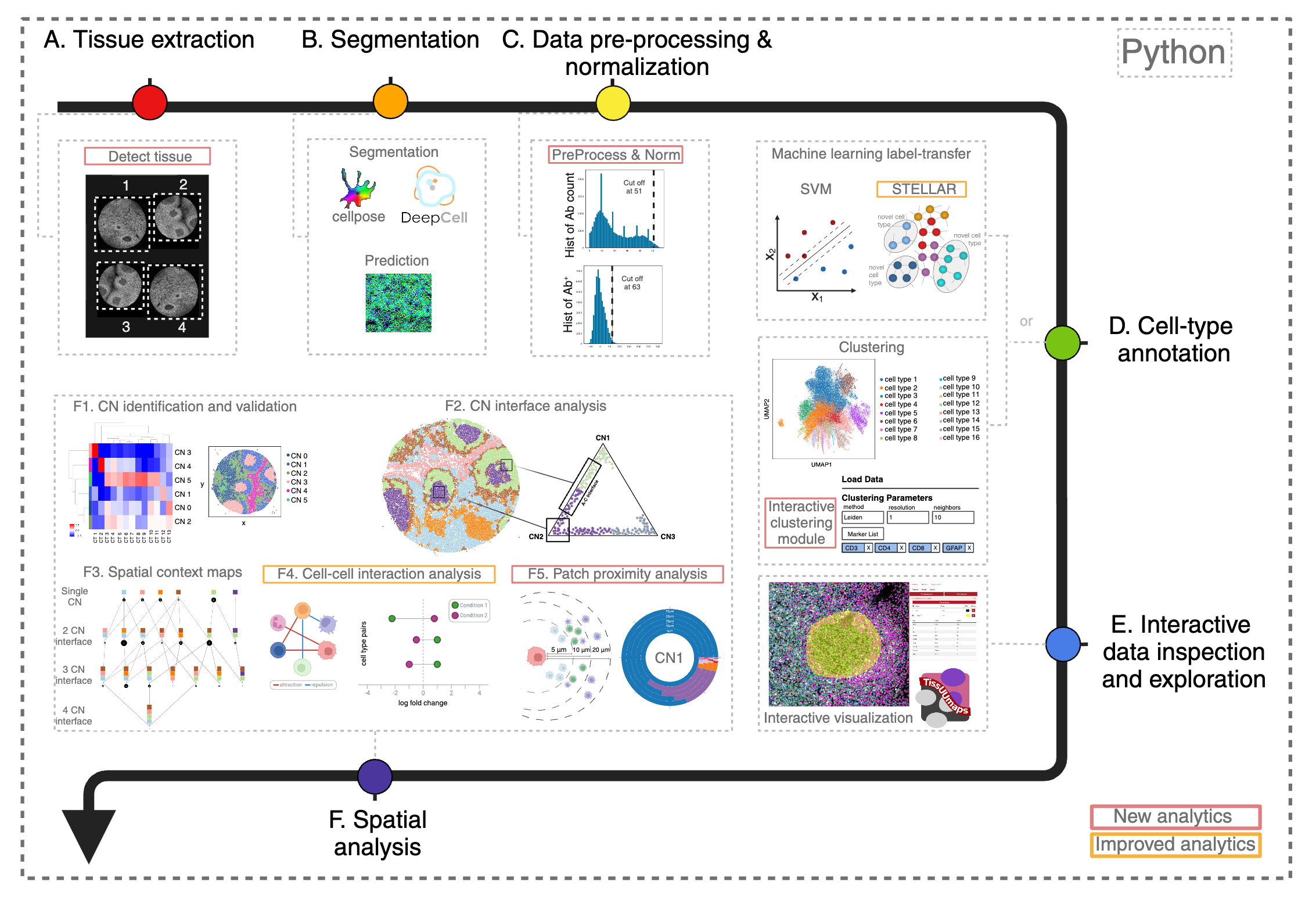
General outline of SPACEc analysis